Scan Fax
Fax
Fax
Fax
Scan
Fax
Scan
Fax
Fax
d0bN%
=5!”//?
hj5&4
mk9#¥
MX-M753N/M623N
encrypts the scanned data
Requests password entry
for viewing the file
*****
User authentication
Output settings for received faxes
A A A B
Prevents data leak
Data Security SystemIP/MAC Address Filtering
Unknown IP or MAC
addresses will be
denied access
NO!
OK
Copy Data Print Data
Scan Data Fax Data
TOP SECRET
Data Encryption Data Erase
d0bN%
=5!”//?
hj5&4
mk9#¥
The data generated
for each job is
automatically erased
once that job is
finished
Confidential document
with copy prevention data
Unauthorised attempt
to make a copy
Results in a blank page
ABC
Example: Unauthorised copying
DesktopSuper G3 fax
Client PCs
Internet
Network folderUSB memory
E-mail
Internet fax
FTP server
Scan to
Scan
Document
IMAGE SENDING
5
6
A3 Colour Network Scanning
The MX-M753N/M623N works as a full-colour network
scanner. Converting any type of paper-based document, up to A3
in size, into an editable digital file is as easy as making a copy. The
MX-M753N/M623N supports TIFF, PDF, encrypted PDF, compact
PDF*
1
, JPEG, and XPS (XML Paper Specification) file formats. The
MX-M753N/M623N also offers Auto Colour Selection for
choosing the right mode to scan originals, Suppress Background
(Auto), and Blank Page Skip functions.
*1: Requires optional MX-EBX3.
Multiple Distribution of Scanned Files
With the touch of a few buttons, you can choose different ways to
distribute your scanned documents. Scan to E-mail sends
documents as an e-mail attachment. Scan to FTP Server scans
documents directly to an FTP server for storage. Scan to Desktop
sends scanned documents directly to your PC desktop. Scan to
Network Folder (SMB) sends files to a shared folder on a
networked Windows PC. Scan to USB Memory scans documents
directly to USB memory devices. Scan to Fax enables conventional
faxing or Internet faxing.
LDAP Support
Built-in LDAP (lightweight directory access protocol) support
eliminates the need to enter or register full addresses. By entering
the first few letters of the recipient’s name, the MX-M753N/
M623N displays a list of possible
matches from your company’s LDAP
server. Selected addresses can be
stored to the MX-M753N/M623N’s
address book.
High-Speed Faxing
The optional MX-FXX2 Fax Expansion Kit turns the MX-M753N/
M623N into a 33.6 Kbps Super G3 fax. Using JBIG compression
technology, the MX-M753N/M623N can send an A4 size page in
under 3 seconds*. Use the 150-sheet DSPF to further boost faxing
efficiency. Additionally, Quick On-Line Transmission can start
dialling and transmitting as soon as the first page is scanned into
memory, you can send documents in less time.
* Based on Sharp’s standard chart with approximately 700 characters (A4
long-edge feeding) at standard resolution.
Automated Fax Finishing
The MX-M753N/M623N eliminates the need to copy and staple
received faxes by hand. Simply use the Fax Output setting on the
LCD control panel to designate the number of copies. With
finishing options installed,
the MX-M753N/M623N
will even automatically
staple these documents for
you.
PC-Fax/PC-Internet Fax
Directly send a document created on your PC to a recipient’s fax
machine via a phone line or the Internet without printing to paper.
Save time and paper costs while retaining original document
quality.
Note: PC-Internet Fax requires optional MX-FWX1; PC-Fax requires MX-FXX2.
Internet Fax
Economically send and receive faxes to and from other ITU-T
T-37-compliant Internet fax machines via the Internet. The
MX-M753N/M623N supports Direct SMTP; outgoing Internet
faxes do not go through your mail server, making transmission
faster and cheaper.
Note: Requires optional MX-FWX1.
Paperless Faxing with Inbound Routing
Paperless faxing with inbound routing lets you check incoming
faxes via e-mail before printing. It can also forward incoming faxes
to an FTP server, a network folder (SMB), or a PC desktop. Files
can be saved in either PDF or TIFF (single/multi).
Note: Requires optional MX-FXX2 or MX-FWX1.
Other Key Features
Scan & Fax
• One-touch auto dial keys register up to 1,000 numbers for
frequently used destinations
• Broadcast transmission to up to 500 destinations
• Programme keys (up to 48 keys) are available to set up
frequently used transmissions for instant recall
• Easy text entry* lets you enter addresses, file names, subject
titles, or messages from the LCD control panel
* Only addresses can be entered for faxing.
• Mixed size original scanning automatically distinguishes
documents of mixed sizes fed through the DSPF
Fax
• Duplex transmission/reception sends and prints out
two-sided documents
• Flash memory backup ensures documents remain safely
backed up in memory, even in the event of a power failure
• Rotation transmission/reception rotates incoming and
outgoing faxes to match the direction of the printing paper
• Fax destination confirmation allows users to reconfirm fax
numbers before sending to prevent transmission errors
SECURITY
Powerful Multi-Layered Security
With multiple levels of network and data security to cover a wide range of security needs, Sharp’s security solutions
protect your business assets and bring peace of mind. The MX-M753N/M623N safeguards sensitive data with powerful,
enhanced security functions that eliminate the worry of unauthorised use and guarantee greater protection for your
confidential information.
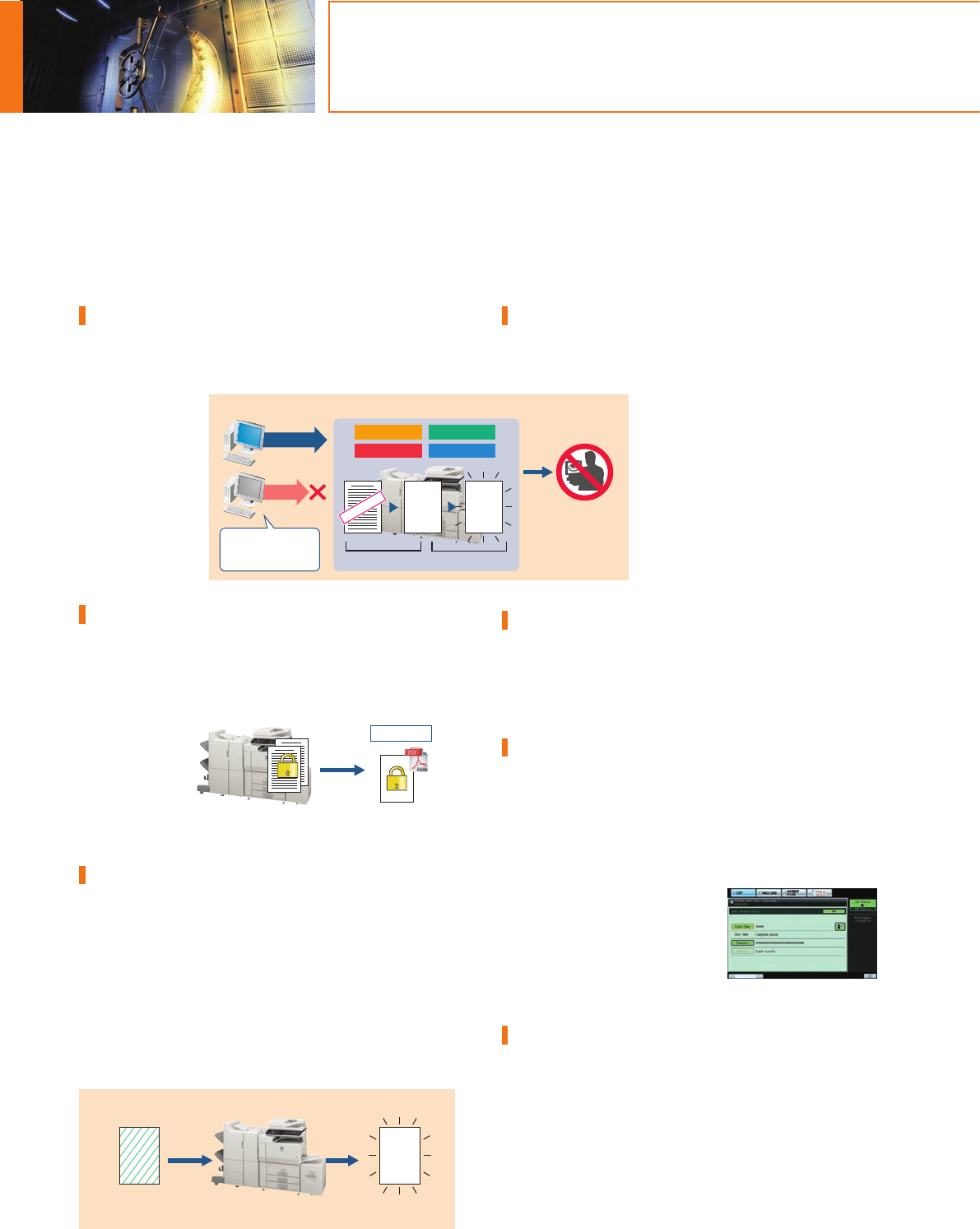
Data Security Kit
Digital copier/printers or MFDs can retain hundreds of pages of
confidential information from previous jobs on their hard disks or
internal memory. To safeguard this information from unauthorised
access, the optional
Data Security Kit
automatically
encrypts and
erases the data after
each job is complete
as well as data
stored both on the
hard disk and in the
address book.
Encrypted PDF with Password Protection
To prevent unauthorised viewing of confidential image data, the
MX-M753N/M623N enables users to password protect and
encrypt PDF data. By setting a password when scanning, users can
transmit a PDF over the network in encrypted format. Then, after
transmission,
viewers will only
gain access to the
encrypted PDF
after successfully
re-entering the
chosen password.
Document Control Function
Document Control prevents unauthorised copying, scanning,
faxing, and filing of confidential documents. This is how it works:
the MX-M753N/M623N embeds copy prevention data onto a
document when it is first copied or printed. It will then detect this
data the next time someone tries to make a copy of the
document. Any unauthorised attempts to copy a Document
Controlled-document will simply be cancelled or result in the
output of a blank page.
Note: Requires optional Data Security Kit. May not work for certain types of
documents or paper.
Secure Network Access
The MX-M753N/M623N’s IP/MAC address filtering function
provides highly secure operation by restricting access to these
MFDs on your office network. Only PCs that have either their IP
address or MAC (media access control)
address registered are allowed to use the
MX-M753N/M623N. Attempted access
from an unknown IP or MAC address will
be denied, preventing unauthorised use.
These MFDs also support the IEEE 802.1X
standard for port-based network access
control, which blocks all access from
unauthorised devices.
Secure Sockets Layer
SSL (secure sockets layer) enables the encryption of data
communications to prevent data leakage through the network
when printing via IPP, browsing secure Web pages (HTTPS), or
communicating via e-mail (SMTP and POP3) or FTP (FTPS).
User Authentication
The MX-M753N/M623N prevents unauthorised use by requiring
passwords for machine access. This safeguarded solution can
register up to 1,000 users in three access levels as Administrator,
User, or Guest and can designate to which function user
authentication applies. The MX-M753N/M623N can, for example,
be set to allow copying by all users while restricting colour
scanning to designated users. The
MX-M753N/M623N works with an
external Active Directory server
to extend user authentication to
multiple MFDs and a greater number
of users.
IPv6 and IPsec Support
The MX-M753N/M623N supports IPv6, the next-generation
Internet protocol. An obligatory part of IPv6 is IPsec (IP Security), a
set of protocols for securing Internet protocol (IP) communications.
IPsec encrypts and authenticates traffic between specified parties,
giving IPsec-compatible products an extremely high level of
network security.

 (210 paginas)
 (60 paginas)
 Manymanuals.com
 Manymanuals.de
 Manymanuals.fr
 Manymanuals.it
 Manymanuals.pl
 Manymanuals.cz
 Manymanuals.es
 Manymanuals-pt.com
Comentarios a estos manuales