Copy
Print
MX-M753
MX-M753
stored on hard disk
in proper page order...
...and stacked offsetMulti-page original is scanned...
(or print data sent from PC)
MX-M753
MX-M753
MX-M753
Copy
Print
Copy
Print
Copy
Copy
Print
Copy
Print
Copy
Print
Print
Copy
Print
Copy
Print
Copy
Copy
Copy
Print
Print
600DPI 1200DPI
Equivalent to 150/124 cpm/ppm
75/62 cpm/ppm 75/62 cpm/ppm
75
CPM
PPM
MX-M753N
62
CPM
PPM
MX-M623N
Macintosh
Ethernet
(10Base-T/100Base-TX/1000Base-T)
Print
Windows®
Windows Server®
A Variety of Job Finishing Options
Saddle stitching Stapling Hole punchingCover insertion
Super-Efficient Output
The MX-M753N/M623N delivers a fast output of 75/62
cpm/ppm*, enabling the production of large-volume documents
that include memory-intensive graphics in less time. The first copy
comes out in just 3.5/4.0 seconds to save valuable time when
performing multiple short-run jobs. What’s more, the short,
straight paper path minimises misfeeds,
saving you paper and toner costs.
* A4, long-edge feeding
Productive Collated Output from Memory
The MX-M753N/M623N’s Scan Once/Print Many function only
requires a single scan of a multi-page original for copying, and the
RIP Once/Print Many function only needs to download print data
once from the PC for printing. The machine then automatically
saves the data into memory and outputs collated sets of copies or
printouts in the proper page order (electronic sorting), with each
set offset stacked for easier retrieval.
Speedy Document Feeding
The MX-M753N/M623N comes standard with a highly efficient
150-sheet DSPF (duplex single pass feeder), which scans both
pages of two-sided documents up to A3 in size in one pass.
Doing away with the reversing circuit minimises paper misfeeds
and vastly improves reliability. With a scanning speed of 75
originals per minute (opm) for both two-sided and one-sided
originals, the MX-M753N/M623N finishes even large projects
quickly.
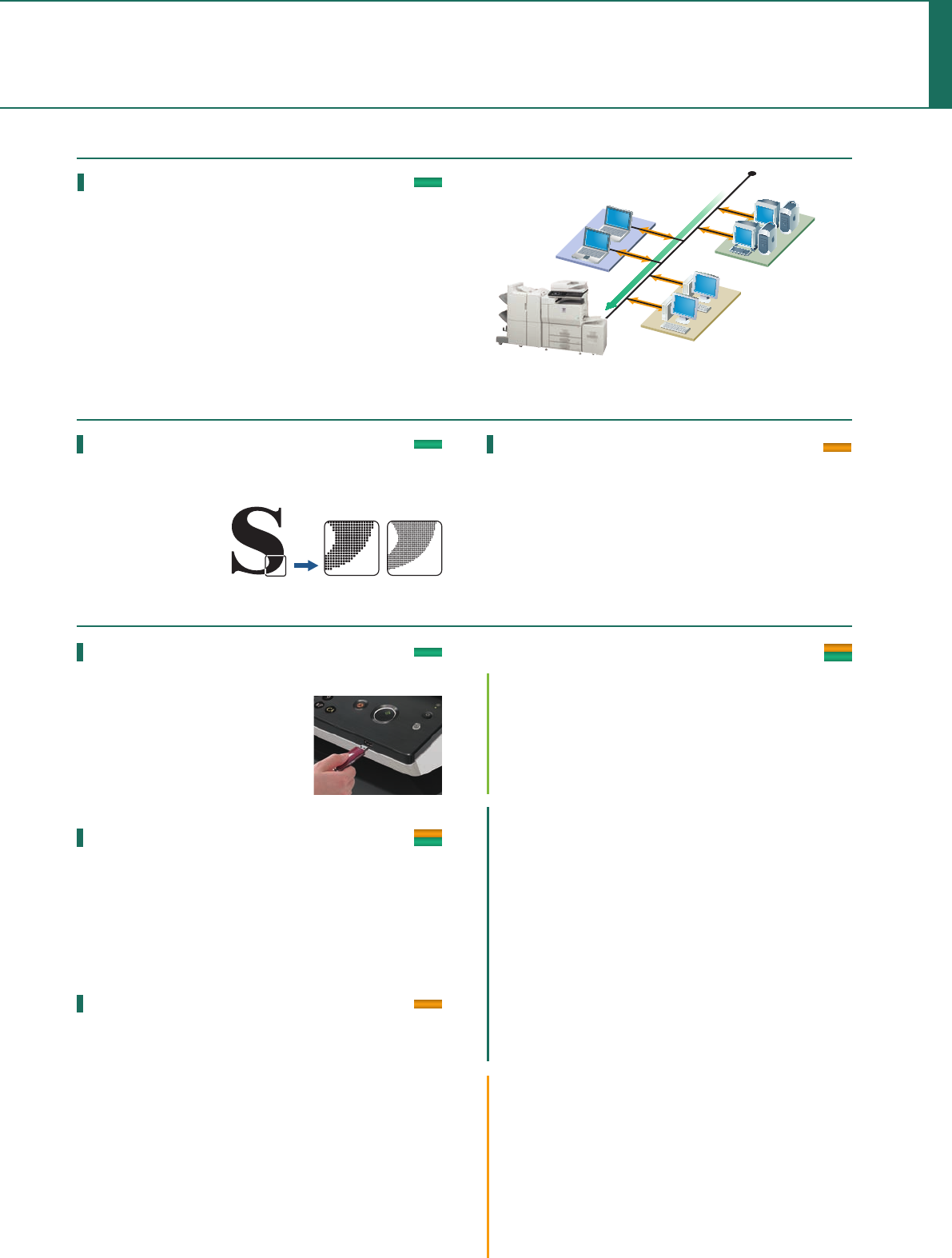
Network Tandem Function
When two of these MFDs are connected to the same office
network, you can use both simultaneously to double copying/
printing output to up to 150/124 cpm/ppm. Large-volume jobs
can be completed with ease, enabling you to meet tight deadlines.
Built-in Stackless Duplex Module
The MX-M753N/M623N can make two-sided copies and
printouts using its built-in stackless duplex module, effectively
reducing paper costs as well as saving filing space. Duplex copying
is even more effective when used together with the DSPF.
Advanced Finishing
With plenty of options available to finish the job, the MX-M753N/
M623N makes it easy to create professional-looking booklets. The
Saddle Stitch Finisher option staples documents up to 50 sheets
and can fold and staple sets of documents up to 15 sheets to
make completed booklets. It also features a bi-folding function
that folds individual pages, up to size A3, in half—eliminating the
tedious task of folding pages by hand. A Finisher is available for
jobs that require simple sorting and stapling, while another option,
the 100-Sheet Stapler/Finisher, staples documents up to 100
sheets. For truly professional results, an optional Inserter adds
pre-printed covers or inserts up to 256 g/m
2
to documents. Plus, a
Punch Module option punches holes in documents for easy filing.
Large Paper Capacity
For high-volume work, the
MX-M753N/M623N can
accommodate an optional
3,500-sheet large-capacity tray
for a total capacity of 6,600
sheets. When a tray runs out of
paper, the Auto Tray Switching
function automatically switches
to another paper tray filled with the same size paper, allowing you
to do extra-large volume jobs without worry.
Job Build for Large-Volume Scanning
The MX-M753N/M623N easily handles large-volume copy jobs
exceeding the DSPF’s 150-sheet*
1
capacity. For example, a
370-sheet original can be scanned as batches of 150 + 150 + 70
sheets and automatically stored on the MX-M753N/M623N’s hard
disk*
2
. Users can then print the entire document in a single run.
*1: A4, 80 g/m
2
*2: The number of pages that can be stored for the Job Build function
depends on the machine’s HDD capacity and other conditions.
COPYING & NETWORK PRIN
TING
4
SUPERB IMAGE QUALITY
VERSATILE
Supports Most Office Environments
• The MX-M753N/M623N works as a network printer with the latest
and most commonly used operating systems and network
protocols, including IPv6, and even in mixed OS environments. You
get fast, powerful network printing via the 1000Base-T Gigabit
Ethernet standard.
• The MX-M753N/M623N supports PCL5e and PCL6 printer
languages. For compatibility with PostScript 3, the MX-PKX1 PS3
Expansion Kit is available.
NETWORK-READY
Optimum Copy Quality
600 x 600-dpi resolution and 256-level greyscale ensure finely
detailed reproduction, while Digital Auto Exposure Control
provides optimum copy contrast. For best results, there are seven
exposure modes to choose from. Users can, for example, select
Text mode for text-only originals or Photo mode for detailed,
high-quality reproduction of photos and delicate halftone images.
USB Memory Direct Print
One of the two USB ports on the MX-M753N/M623N is located at
the front of the MFD beneath the
control panel. It comes in handy when
printing data directly from USB memory
devices—an indispensable function for
users who are in a hurry or who want
quick machine access without a PC.
Versatile Paper Handling
The MX-M753N/M623N accommodates a wide range of paper
sizes, from A5R to A3. Thanks to its tandem printing method, the
MX-M753N/M623N can handle heavy paper stock up to 209
g/m
2
, overhead transparencies, and other types of paper, further
expanding the range of printing applications.
Image Editing Functions
The MX-M753N/M623N includes various editing functions made
possible by digital technology.
• Multi-Page Enlargement divides an image onto separate
sheets for making posters up to A0 x 2 in size.
• Photo Repeat places multiple copies of an image onto a single
sheet.
• Mirror Image makes a reverse image of the original.
• XY Zoom adjusts the horizontal and vertical ratios independently.
• B/W Reverse reverses the black and white of an image.
Please see specifications for a list of available convenient functions.
Various Copy/Print Applications
Copy & Print
• Tab Copy/Print can copy or print directly onto tabs on
document separators and insert them into assigned positions.
• Multi-Shot copying and N-up printing
• Pamphlet Style copying/printing
• Cover/transparency insertion
Print
• Direct Print*
1
allows PDF*
2
, TIFF, JPEG, or XPS*
3
files to be
printed without using the printer driver or opening
applications.
*1: Direct printing may not support all PDF, TIFF, JPEG, and XPS formats.
*2: Direct PDF printing requires optional MX-PKX1.
*3: Direct XPS printing requires optional MX-PUX1 and MX-ARSMX3.
• Carbon Copy Print mode automatically outputs multiple
printouts of the same data on plain and/or coloured paper;
convenient for invoices and purchase orders.
• Form Overlay can store office document formatting such as
letterheads and overlay contents, eliminating the need for
pre-printed paper.
• Barcode font compatibility
(with optional AR-PF1 Barcode Font Kit)
Copy
• Book Copy is convenient for compiling copies of a book or
bound originals into pamphlet format.
• Card Shot enables one-touch copying of both sides of a card
(credit cards, ID cards, etc.) onto a single page.
• Mixed Size Original Copy mode automatically distinguishes
documents of mixed sizes* (such as A3/B4, B4/A4, etc.) fed
through the DSPF and chooses the appropriate paper.
* Some restrictions apply when combining paper sizes of different
format series.
True 1,200 x 1,200-dpi Printing
The MX-M753N/M623N’s print engine provides razor-sharp
1,200-dpi printing—without sacrificing output speed—for
ultra-clear image quality.
Fine lines and small text
come out crisper and
easier to read.
Saddle stitch finisher
100-sheet stapler/finisher 50-sheet stapler/finisher

 (210 paginas)
 (60 paginas)
 Manymanuals.com
 Manymanuals.de
 Manymanuals.fr
 Manymanuals.it
 Manymanuals.pl
 Manymanuals.cz
 Manymanuals.es
 Manymanuals-pt.com
Comentarios a estos manuales