Sharp MX-B402 Folleto Página 5: ADVANCED WORKFLOW MANAGEMENT
 1
 2
 3
 4
 5
 6
 7
 8
 9
 10
 11
 12
ADVANCED WORKFLOW MANAGEMENT
User-friendly features help increase
document workflow efficiency and optimize
day-to-day operations.
A True Multi-Tasking Document System
The MX-B402 features a
high-performance, 800 MHz true multi-tasking, multi-function
controller
that delivers copy, print, scan and fax jobs continuously for optimum efficiency.*
Some controllers only perform one or two operations at a time. But the MX-B402 continually
processes incoming copy, print, scan and fax jobs even while existing jobs are performed.
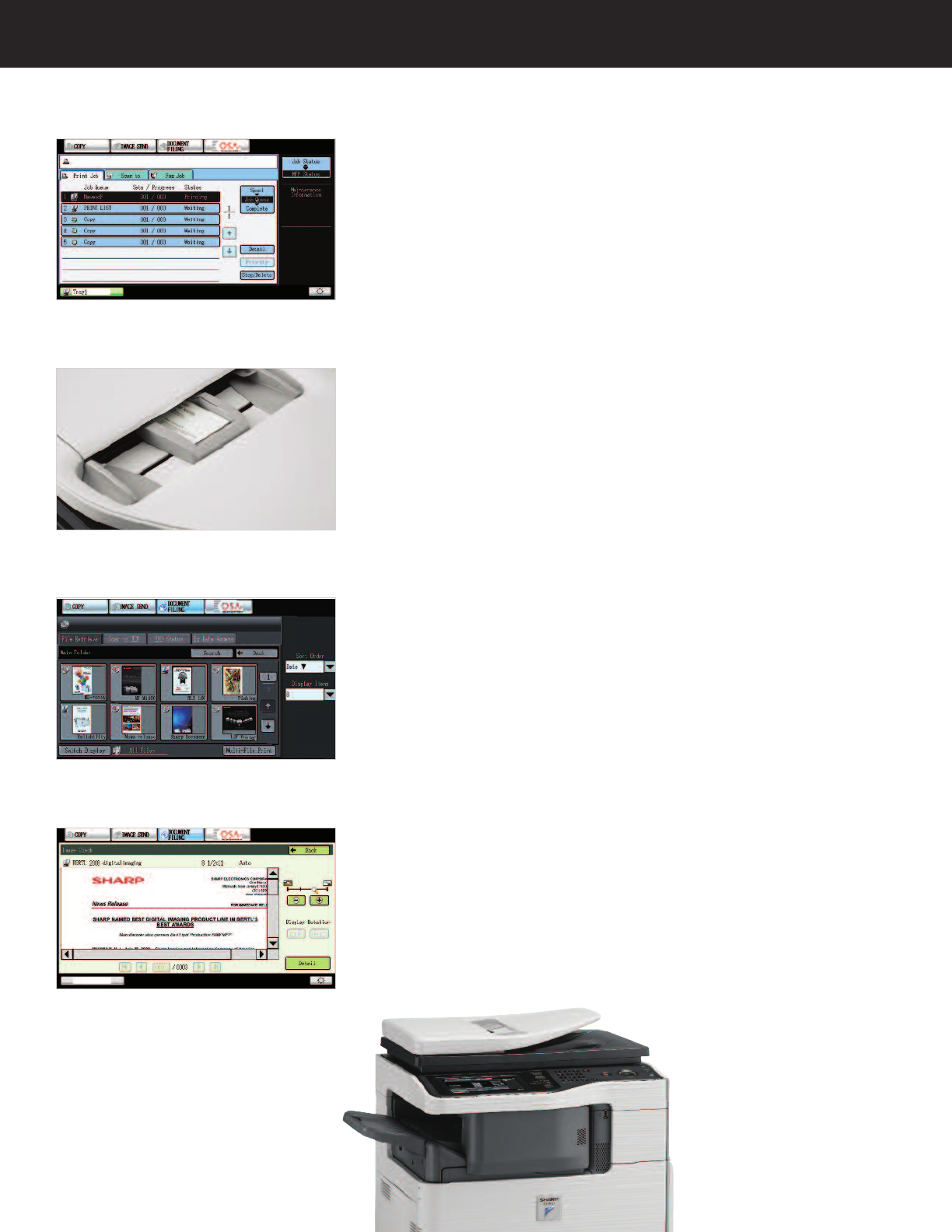
Job Status
allows you to display the status of all of your current print, copy, scan and fax
jobs waiting in queue. Instantly prioritize your job and help
increase workgroup efficiency.
The Result?
A workflow that virtually never slows down–even at crunch time.
Direct USB Scanning and Printing Adds Convenience and Portability
With
Direct USB Scanning and Printing,
the MX-B402 allows users to scan and print files
in a variety of popular formats directly from USB memory devices such as a ThumbDrive
TM
or ClipDrive
TM
. It provides a whole new level of convenience. It comes in handy for scanning
documents directly to USB memory devices and is an easy way to print PDF documents.
Further Enhance Productivity with the Business Card Feeder
Help solve a real-world business problem. The optional
Business Card Feeder
can easily
and automatically feed and scan business cards, and is capable of working with commercially
available business card scanning software to help automate contact database entry. A
differentiator
in today’s world of MFP offerings.
Innovative Document Filing
Sharp’s easy-to-use
Document Filing System
provides up to 50 GB of hard drive space to store
frequently used files such as forms, reports and other commonly used documents for printing and
distribution. Plus, with private storage features and
PIN-code access
, you can store sensitive
documents securely. And, with Sharp’s
Quick File Folder
, you can temporarily store documents
with fast, one-touch simplicity. An easy-to-use backup system helps ensure your files are safe.
To make managing all of your stored jobs simple, the MX-B402 color touch-screen display offers
an intuitive
thumbnail view
to allow walk-up users to easily locate stored jobs even if they don’t
know the file name. For added convenience, an advanced
Image Check
feature allows selected
files to be previewed on-screen—walk-up users can even zoom in, change print attributes or
move a file to another folder. With storage capacity for up to 5,500 pages, your document
workflow can improve significantly.
Get Professional Results with Inner Finishing
The
optional Inner Finisher
can be added without taking up additional floor space. The space
efficient finisher not only provides exceptional productivity but also automates time-consuming
tasks such as stapling, sorting and offset stacking.
*Some features may require optional equipment.
Enhance productivity with the Business Card Feeder.
Job Status displays the status of all print, copy, scan and fax
jobs waiting in queue. Instantly prioritize your job.
Sharp’s easy-to-use Document Filing System with
Thumbnail Preview.
Sharp’s Image Check feature allows users to preview stored
documents at the device. Easily zoom, rotate and scroll.
MX-B402 with space-efficient
optional Inner Finisher
Archivo PDF · ·
Preguntas sobre Sharp MX-B402
Todavía no hay preguntas sobre este manual. Haga la primera.
Productos y manuales relacionados para Multifuncionales Sharp MX-B402
- Multifuncionales Sharp MX-2300N Guía de inicio rápido
 (88 páginas)
- Multifuncionales Sharp MX-B402 Hoja de especificaciones
(2 páginas)
- Multifuncionales Sharp DX-C311 Guía de inicio rápido
(148 páginas)
- Multifuncionales Sharp MX-M623 Manual de usuario
 (4 páginas)
- Multifuncionales Sharp MX-4140N Folleto
(8 páginas)
- Multifuncionales Sharp AR-C200P El manual del propietario
(193 páginas)
- Multifuncionales Sharp MX-2300N Guía de inicio rápido
(207 páginas)
- Multifuncionales Sharp AR-M550N Hoja de especificaciones
(2 páginas)
- Multifuncionales Sharp AR-M230 Manual de usuario
(34 páginas)
- Multifuncionales Sharp AR-M450U Manual de usuario
(6 páginas)
- Multifuncionales Sharp MX-M623 Hoja informativa
(16 páginas)
- Multifuncionales Sharp MX-M260 El manual del propietario
(20 páginas)
- Multifuncionales Sharp MX-4140N Hoja informativa
(16 páginas)
- Multifuncionales Sharp MX-M260 Hoja informativa
(16 páginas)
- Multifuncionales Sharp MX-C250 Hoja informativa
(14 páginas)
- Multifuncionales Sharp MX-B402 Guía de inicio rápido
(56 páginas)
- Multifuncionales Sharp MX-M623 Hoja de especificaciones
(2 páginas)
- Multifuncionales Sharp AR-650 Manual de usuario
(4 páginas)
- Multifuncionales Sharp MX-2300N Manual de usuario
(4 páginas)
- Multifuncionales Sharp MX-2300N Manual de usuario
(4 páginas)