Sharp JW-50FL Manual de usuario Pagina 16

  • Descarga
  • Añadir a mis manuales
  • Imprimir
  • Pagina
    / 16
  • Tabla de contenidos
  • MARCADORES
  • Valorado. / 5. Basado en revisión del cliente
Vista de pagina 15
[2] Program editing during monitoring
You can edit a program during monitoring on Version 5.20 only when you use the same program on JW-
100SP as the program in a PC (programmable controller).
You can not edit a program if you perform [Arrange Ladder Diagram, Before Word Wrapping, Ladder ->
Mnemonic conversion] during monitoring.
The reason is that some difference may occur between the program in the PC and the program on JW-
100SP, because “Arrange Ladder Diagram” or any other operations convert Ladder to Mnemonic.
If you can not edit a program, Perform [PC Transfer – Read], [PC Transfer – Verification] operations. The
program can be edited again.
[3] Version 5.20 does not allow you to edit symbol/comments on the data memory
window.
[4] Correction and storage of structured program are not supported.
(Applicable to previous versions as well)
JW-100SP can only read structured programming files recorded in a PC hard disk (HDD) or recording
media, transfer a structured program in JW30H (control module) to a PC, display it on the screen, and
monitor it. A structured program can be neither corrected nor saved in HDD or recording media.
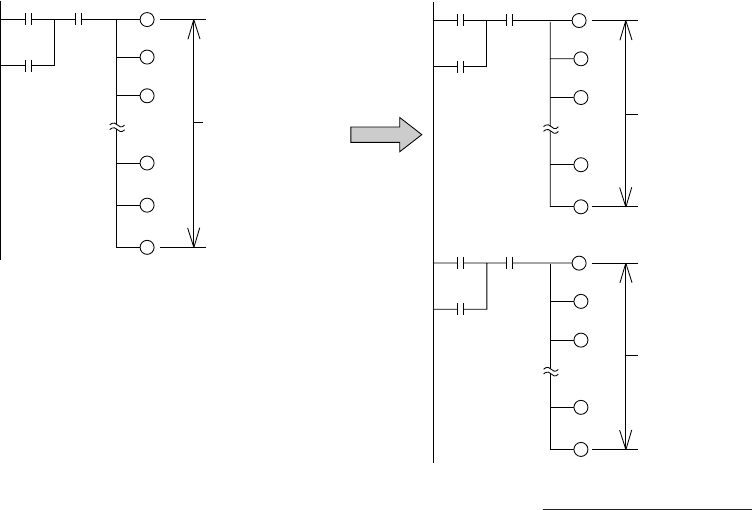
[5] Limitation on the ladder program editing screen (Applicable to previous versions as well)
1 network must be created within 100 rows on the Ladder program editing screen.
If any of the circuits has 1 network created over 100 rows when a program read from programmable
controller is converted to ladder diagram, correct it so that 1 network circuit should be within 100 rows. (A
circuit with 1 network created over 100 rows will have a compiling error at the time of program check or
mnemonic conversion.)
No.16/16
0020
0030
0023 1000
1005
1012
2010
2020
2300
1 network created
over 100 rows
0020
0030
0023 1000
1005
1012
1100
1110
100 rows max.
0020
0030
0023 1200
1210
1220
2020
2300
100 rows max.
Edit
[Example]
Produced in February 2003
Vista de pagina 15
1 2 ... 11 12 13 14 15 16

Comentarios a estos manuales

Sin comentarios