Sharp AL-2021 Especificaciones Página 78: TROUBLESHOOTING THE UNIT
 1
 2
 3
 4
 5
 6
 7
 8
 9
 10
 11
 12
 13
 14
 15
 16
 17
 18
 19
 20
 21
 22
 23
 24
 25
 26
 27
 28
 29
 30
 31
 32
 33
 34
 35
 36
 37
 38
 39
 40
 41
 42
 43
 44
 45
 46
 47
 48
 49
 50
 51
 52
 53
 54
 55
 56
 57
 58
 59
 60
 61
 62
 63
 64
 65
 66
 67
 68
 69
 70
 71
 72
 73
 74
 75
 76
 77
 78
 79
 80
 81
 82
 83
 84
 85
 86
 87
 88
 89
 90
 91
9
78
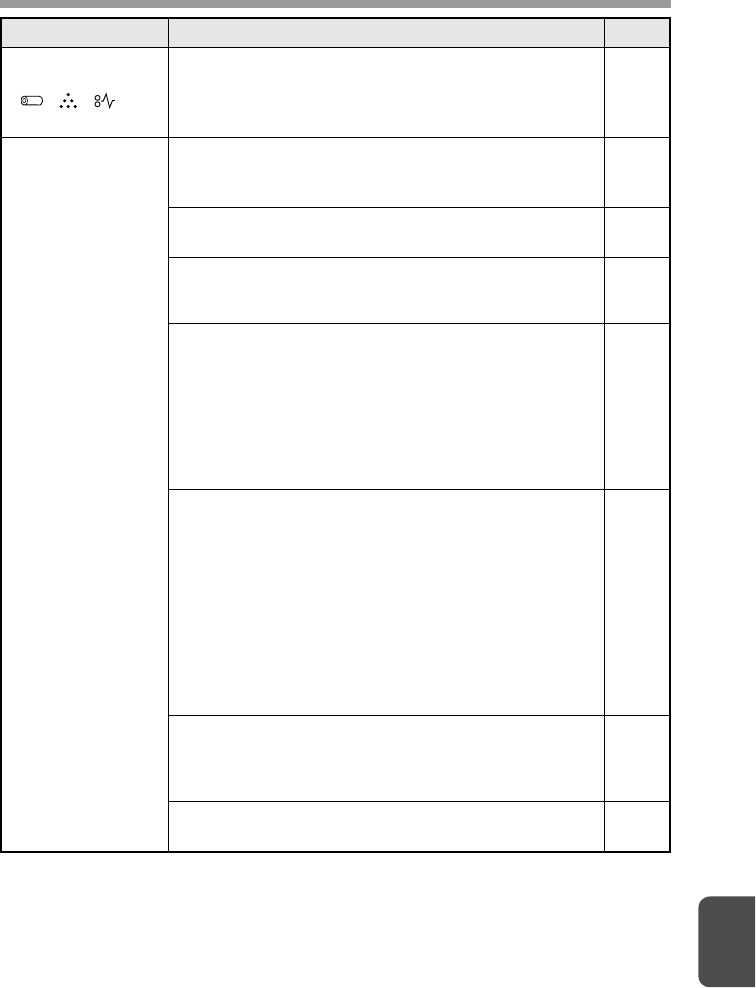
Any one of the
alarm indicators
(
,
,
)
is
lit or blinking.
See "STATUS INDICATORS" to check the meaning of
the alarm indicator, and take appropriate action.
82
Poor scanning
quality.
The document glass or the underside of the document
cover/SPF is dirty.
→
Clean regularly.
71
Original smudged or blotchy.
→
Use a clean original.
–
You have not specified a suitable resolution.
→
Make sure that the resolution setting in the scanner
driver is appropriate for the original.
–
You have not specified a suitable value for the "B/W
Threshold" setting.
→
If you are scanning with a TWAIN-compliant
application, make sure that a suitable value is specified
for the "B/W Threshold" setting. A larger threshold
value makes your output darker, while a small
threshold value makes it lighter. To adjust the threshold
automatically, click the "Auto Threshold" button on the
"Image" tab of the "Professional" screen.
–
The brightness and contrast settings are not suitable.
→
If you are scanning with a TWAIN-compliant application
and the resulting image has unsuitable brightness or
contrast (for example it is too bright), click the "Auto
Brightness/Contrast Adjustment" button on the
"Colour" tab of the "Professional" screen. Click the
"Brightness/Contrast" button to adjust the brightness
and the contrast while viewing the scanned output
image on the screen. If you are scanning with a WIA-
compliant application or the "Scanner and Camera
Wizard", click "Adjust the quality of the scanned
picture" or the "Custom settings" button, and adjust the
brightness and contrast in the screen that appears.
–
The original is not placed face up in the SPF or face
down on the document glass.
→
Place the original face up in the SPF or face down on
the document glass.
26, 27
The original was not placed in the correct position.
→
Place the original correctly.
26, 27
Problem
Cause and solution
Page
Archivo PDF · ·
Preguntas sobre Sharp AL-2021
Todavía no hay preguntas sobre este manual. Haga la primera.
Productos y manuales relacionados para Multifuncionales Sharp AL-2021
- Multifuncionales Sharp MX-B402 Manual de usuario
 (50 páginas)
- Multifuncionales Sharp FO-155 Especificaciones

 (165 páginas)
- Multifuncionales Sharp MX-4140N Manual de instalación
(19 páginas)
- Multifuncionales Sharp JW-50FL Manual de usuario
(201 páginas)
- Multifuncionales Sharp MX-4140N Manual de usuario
(12 páginas)
- Multifuncionales Sharp CPD-3830 Manual de usuario
(12 páginas)
- Multifuncionales Sharp CD600 - B/W - Fax Manual de usuario
(23 páginas)
- Multifuncionales Sharp AR-810 Manual de instrucciones
(178 páginas)
- Multifuncionales Sharp AL-1566 Especificaciones
(116 páginas)
- Multifuncionales Sharp AM-400 Especificaciones
(162 páginas)
- Multifuncionales Sharp AL-2051 Especificaciones
(173 páginas)
- Multifuncionales Sharp MX-5111N Manual de usuario
(12 páginas)
- Multifuncionales Sharp AL-2021 Manual de usuario
(91 páginas)
- Multifuncionales Sharp MX-C250 Manual de instalación
(20 páginas)
- Multifuncionales Sharp AM-300 Especificaciones
(167 páginas)
- Multifuncionales Sharp AL-2060 Especificaciones
(112 páginas)
- Multifuncionales Sharp AL-1555 Series Manual de usuario
 (37 páginas)
- Multifuncionales Sharp AL-2050 Especificaciones
(116 páginas)
- Multifuncionales Sharp AL-1552 Manual de usuario
(81 páginas)
- Multifuncionales Sharp AR-168N Manual de usuario
 (108 páginas)