Sharp AR-C250 Especificaciones Pagina 153
- Pagina / 161
- Tabla de contenidos
- SOLUCIÓN DE PROBLEMAS
- MARCADORES

- DigitalDigital 1
- FOR YOUR RECORDS 2
- COLOR COPY SAMPLES 3
- KEY OPERATOR CODE NUMBER 6
- 3. Sharpness (See page 3-18.) 8
- Color Balance 10
- CONTENTS 11
- INTRODUCTION 12
- USING THIS MANUAL 12
- CHAPTER 1 13
- INSTALLATION REQUIREMENTS 14
- CAUTIONS 15
- Cautions on laser 16
- POWER ON AND OFF 17
- Power save modes 18
- INFORMATION FUNCTION 19
- USING THE TOUCH PANEL 20
- Function setting icons 21
- CHAPTER 2 23
- AUDITING ACCOUNTS 24
- Original size detector 26
- Centering scale 26
- USING THE RADF 28
- AUTO IMAGE 33
- Manual selection 34
- REDUCTION/ENLARGEMENT/ZOOM 34
- PAPER TYPE 36
- INTERRUPT 37
- EXPOSURE ADJUSTMENTS 38
- EXPOSURE PAPE 39
- Storing a job program 40
- Deleting a stored job program 41
- Recalling a job program 41
- JOB MEMORY 41
- CHAPTER 3 43
- SPECIAL FUNCTIONS XY zoom 45
- MARGIN SHIFT 46
- RIGHT LEFT 47
- READY TO 48
- SPECIAL FUNCTIONS Erase 49
- DUAL PAGE 51
- SPARENCY INSERTS 51
- CENTERING 52
- TRANSPARENCY INSERTS 53
- RANSPARENCY INSERTS 55
- T ON FRONT COVER? 57
- COLOR ADJUSTMENTS 58
- IMAGE EDITING FUNCTIONS 66
- INFORMATIO 73
- CHAPTER 4 81
- CHAPTER4 83
- ADDING TONER 85
- USED TONER DISPOSAL 88
- GENUINE SUPPLIES 89
- CHAPTER 5 91
- MISFEED REMOVAL 100
- MAINTENANCE REQUIRED 101
- TONER COLLECTING CONTAINER OF 102
- TRANSFER UNIT 102
- TROUBLESHOOTING 103
- Self-diagnostic function 104
- CHAPTER 6 105
- PART NAMES AND FUNCTIONS 106
- Interior 107
- Operation Panel 108
- READY TO COPY 109
- EXPOSURE PAPER SELECT 109
- COPY RATIO 109
- 8/ 11AUTO 109
- USER MAINTENANCE 110
- ER DARKER 111
- SPECIFICATIONS 112
- CHAPTER 7 115
- SYSTEM CONFIGURATION 116
- 20-BIN STAPLE SORTER (AR-SS2) 117
- OPTIONAL EQUIPMENT 118
- 20-bin staple sorter (AR-SS2) 118
- SORTER CAPACITY 119
- Stapling position 120
- Using the optional RADF 121
- Manual stapling 122
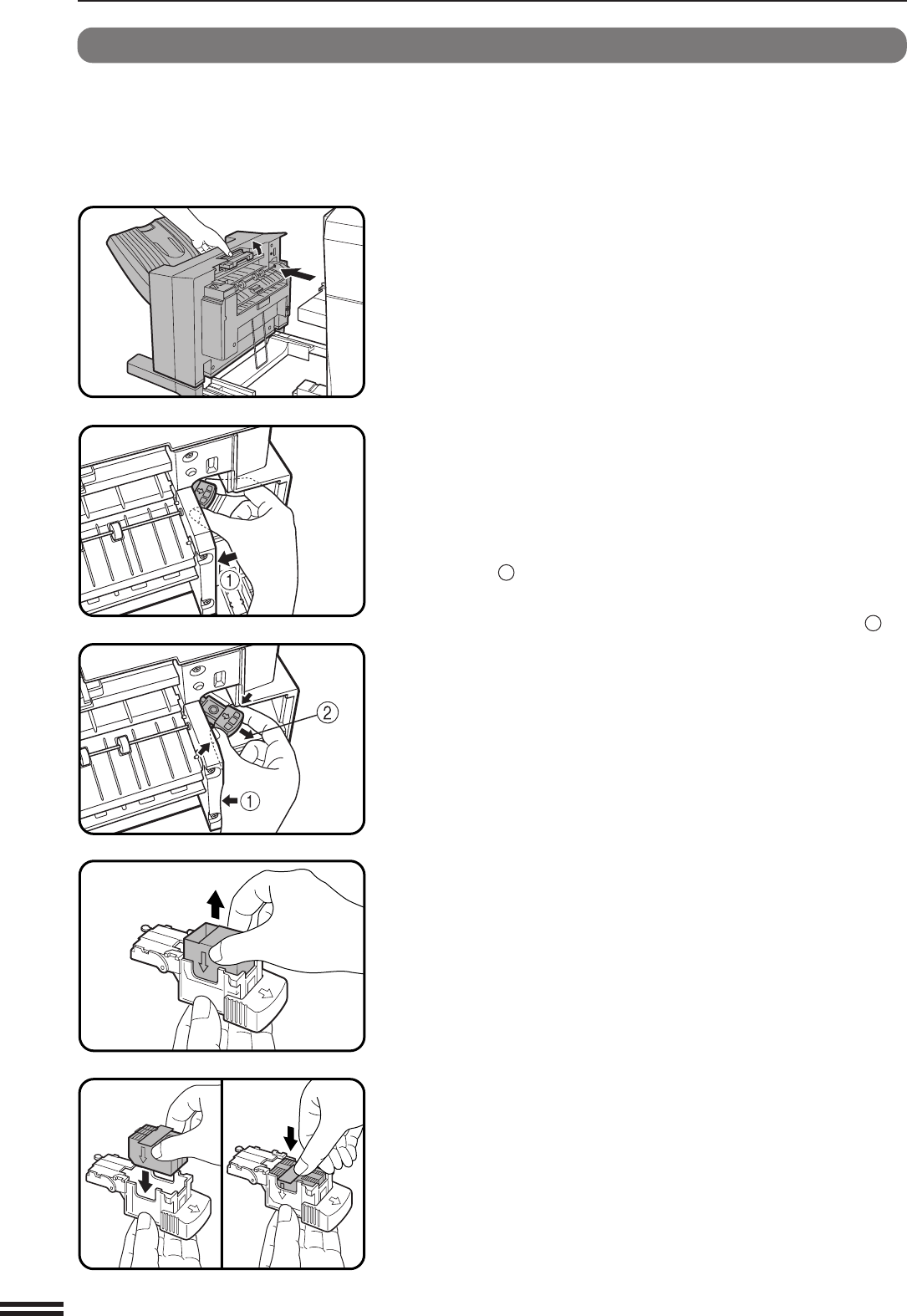
- Staple cartridge replacement 123
- Staple jam removal 125
- MISFEED HAS OCCURRED 127
- CLEAR INDICATED AREA 127
- Specifications 128
- LARGE CAPACITY TRAY (AR-LC2) 129
- Loading copy paper 130
- FINISHER (AR-FN4) 133
- OFFSET mode 134
- NON OFFSET mode 134
- Offset stack 134
- CHAPTER7 136
- Finisher (AR-FN4) 136
- Misfeed removal 140
- WARNING: 160
- PRINTED IN JAPAN 161
- SHARP ELECTRONICS CORPORATION 161
Relacionado con productos y manuales para Multifuncionales Sharp AR-C250
 (12 paginas)
(197 paginas)
(148 paginas)
(12 paginas)
(197 paginas)
(148 paginas)
 (160 paginas)
(12 paginas)
(12 paginas)
(12 paginas)
(30 paginas)
(50 paginas)
(160 paginas)
(12 paginas)
(12 paginas)
(12 paginas)
(30 paginas)
(50 paginas)

 (165 paginas)
(201 paginas)
(12 paginas)
(12 paginas)
(178 paginas)
(12 paginas)
(165 paginas)
(201 paginas)
(12 paginas)
(12 paginas)
(178 paginas)
(12 paginas)
© 2020, manymanuals.es. Todos los derechos reservados | 0.037 s |
 Manymanuals.com
 Manymanuals.de
 Manymanuals.fr
 Manymanuals.it
 Manymanuals.pl
 Manymanuals.cz
 Manymanuals.es
 Manymanuals-pt.com
Comentarios a estos manuales