Sharp AR-4551 Especificaciones Pagina 246
- Pagina / 286
- Tabla de contenidos
- SOLUCIÓN DE PROBLEMAS
- MARCADORES

- LASER PRINTER 1
- Operation Manual (for copier) 1
- (B/W scanner module/DSPF) 5
- Operation Panel 6
- AUTOMATIC DOCUMENT FEEDER 8
- SETTING ORIGINALS 9
- Face down Face down 10
- NORMAL COPYING 11
- 2-SIDED COPY 12
- Original 13
- COPY RATIO 14
- PAPER SELECT 14
- Five sets of copiesOriginals 15
- READ-END 15
- Original Copy 16
- EXPOSURE ADJUSTMENTS 17
- REDUCTION/ENLARGEMENT/ZOOM 18
- Manual selection 19
- SPECIAL MODES 21
- MARGIN SHIFT 22
- PAMPHLET COPY 22
- RIGHT LEFT 22
- Two-sided copying 22
- One-sided copying 22
- JOB BUILD 23
- MULTI SHOT 27
- JOB PROGRAM MEMORY 28
- PRESS PROGRAM NUMBER 29
- JOB PROGRAMS 29
- Setting programs 35
- Device control 36
- Operation manual for copier 38
- TABLE OF CONTENTS 41
- ABOUT THE WEB PAGE 42
- SETTING PASSWORDS 42
- STORING SENDER INFORMATION 45
- STORING A CUSTOM DIRECTORY 45
- ■ Condition setting screen 46
- SENDING AN IMAGE 48
- READY TO SEND 49
- ORIGINAL 51
- ST ND RD 51
- RESOLUTION 51
- PROGRAMMED 51
- FILE FORMAT 51
- SELECTING THE RESOLUTION 53
- SELECTING THE EXPOSURE 54
- SELECTING THE FILE FORMAT 55
- THE TOUCH PANEL 57
- ■ CAUTION: 72
- ■ WARNING: 72
- CONVENIENT METHODS OF USE 75
- FCC NOTICE TO USERS 76
- IMPORTANT SAFETY INFORMATION 77
- NOTICE FOR USERS IN 78
- AVIS POUR NOS 78
- UTILISATEURS AU CANADA 78
- A LOOK AT THE OPERATION PANEL 81
- ORIGINALS 84
- LOADING A DOCUMENT 85
- CONVENIENT DIALING METHODS 89
- ● One-touch dialing 89
- ● Group dialing 89
- ● Redialing 89
- ● On-hook dialing 89
- SENDING A FAX 92
- ■ Quick On-line 94
- ■ Image rotation 94
- TRANSMISSION BY AUTO-DIALING 95
- CANCELING A FAX TRANSMISSION 96
- RECEIVING FAXES 97
- (BROADCAST TRANSMISSION) 100
- USING BROADCAST TRANSMISSION 101
- (TIMER TRANSMISSION) 102
- THE POLLING FUNCTION 103
- USING THE POLLING FUNCTION 104
- USING POLLING MEMORY 105
- MEMORY BOXPROGRAM 106
- OWN NUMBER SENDING 107
- ■ Selecting Dual Page Scan 108
- USING A PROGRAM 109
- USING THE TRANSFER FUNCTION 110
- CHAPTER 4 111
- TRANSMISSION BETWEEN MACHINES 112
- SUPPORTING F-CODES 112
- BOX IN THE OTHER MACHINE 113
- F-CODE POLLING MEMORY 114
- PROCEDURE FOR F-CODE POLLING 115
- Your machine 116
- The other machine 116
- CONFIDENTIAL MEMORY BOX 117
- Does not match 118
- CHAPTER 5 121
- STAMPING SCANNED ORIGINALS 122
- (VERIFICATION STAMP FUNCTION) 122
- CONNECTING AN EXTENSION PHONE 123
- LIST PRINT 124
- RECEIVE MODE 124
- FAX RECEIVE 125
- DIRECTORY 125
- FAX MEMORY:100% 125
- CHAPTER 6 127
- DIAL KEYS AND PROGRAMS 128
- PROGRAMMING 128
- STORING ONE-TOUCH DIAL KEYS 129
- DELETE THE ADDRESS? 131
- SHARP CORPORATION 131
- SHARP CORPORATION 33.MODE 131
- PROGRAMMING A GROUP KEY 132
- SHARP GROUP 133
- STORING A PROGRAM 134
- EDITING AND DELETING PROGRAMS 134
- STORING A GROUP INDEX 135
- CODE MEMORY BOXES 136
- OF TRANSMISSIONS) 137
- MEMORY BOXES (PRINT PIN.) 138
- SENDING ADDRESS LIST 140
- PRINTER TEST PAGE 140
- ALL CUSTOM SETTING LIST 140
- ENTERING CHARACTERS 141
- Touch the AB/ab 12#$% key 142
- CHAPTER 7 143
- PROBLEMS AND SOLUTIONS 146
- CHAPTER 8 147
- KEY OPERATOR PROGRAMS 148
- SETTING PROGRAMS 149
- Fax default settings 150
- Volume: Volume: Volume: 151
- Low Medium High 151
- Fax send settings 152
- Fax receive settings 154
- Deleting a passcode 155
- Programming passcode numbers 155
- PRINTING OUT SETTINGS 156
- CHAPTER 9 157
- SPECIFICATIONS 158
- Operation Manual 162
- Operation manual 163
- Warranty 164
- Trademark Acknowledgments 164
- INSTALLATION REQUIREMENTS 165
- Moving this machine 166
- CAUTIONS 167
- FACSIMILE FEATURE 170
- CONTENTS 171
- CHAPTER 1 173
- INTRODUCTION 174
- MAIN FEATURES 175
- PART NAMES AND FUNCTIONS 176
- Interior 177
- LOADING PAPER 188
- Specifications of paper trays 189
- ADDING TONER 197
- STORAGE OF SUPPLIES 197
- CHAPTER 2 199
- CONNECTING TO A COMPUTER 200
- SOFTWARE FOR WINDOWS 200
- UNINSTALLING PRINTER DRIVERS 201
- AND PRINTER UTILITIES 201
- Before installation 202
- SETTING THE PRINTER DRIVER 203
- PRINTER CONFIGURATION 204
- THROUGH THE NETWORK 204
- JOB CONTROL 207
- Hold job list 208
- Printer account control 210
- USING THE MACHINE AS A POST 211
- SCRIPT PRINTER 211
- ■ Selecting the printer 215
- ■ Paper setting 216
- ■ Print condition setting 216
- CHAPTER 3 219
- MAKING CONFIGURATION SETTING 220
- Default settings 222
- PCL settings 222
- PostScript settings 222
- CUSTOM SETTINGS 223
- Setting items 225
- MISFEED REMOVAL 228
- INFORMATION 229
- Misfeed in the duplex module 233
- TROUBLESHOOTING 234
- USER MAINTENANCE 237
- DUPLEX MODULE 240
- Copying in the duplex mode 242
- MAIL-BIN STACKER 244
- Setting in the printer driver 245
- FINISHER 247
- Finisher functions 248
- Using the finisher functions 249
- Staple cartridge replacement 250
- ■ Checking the staple unit 251
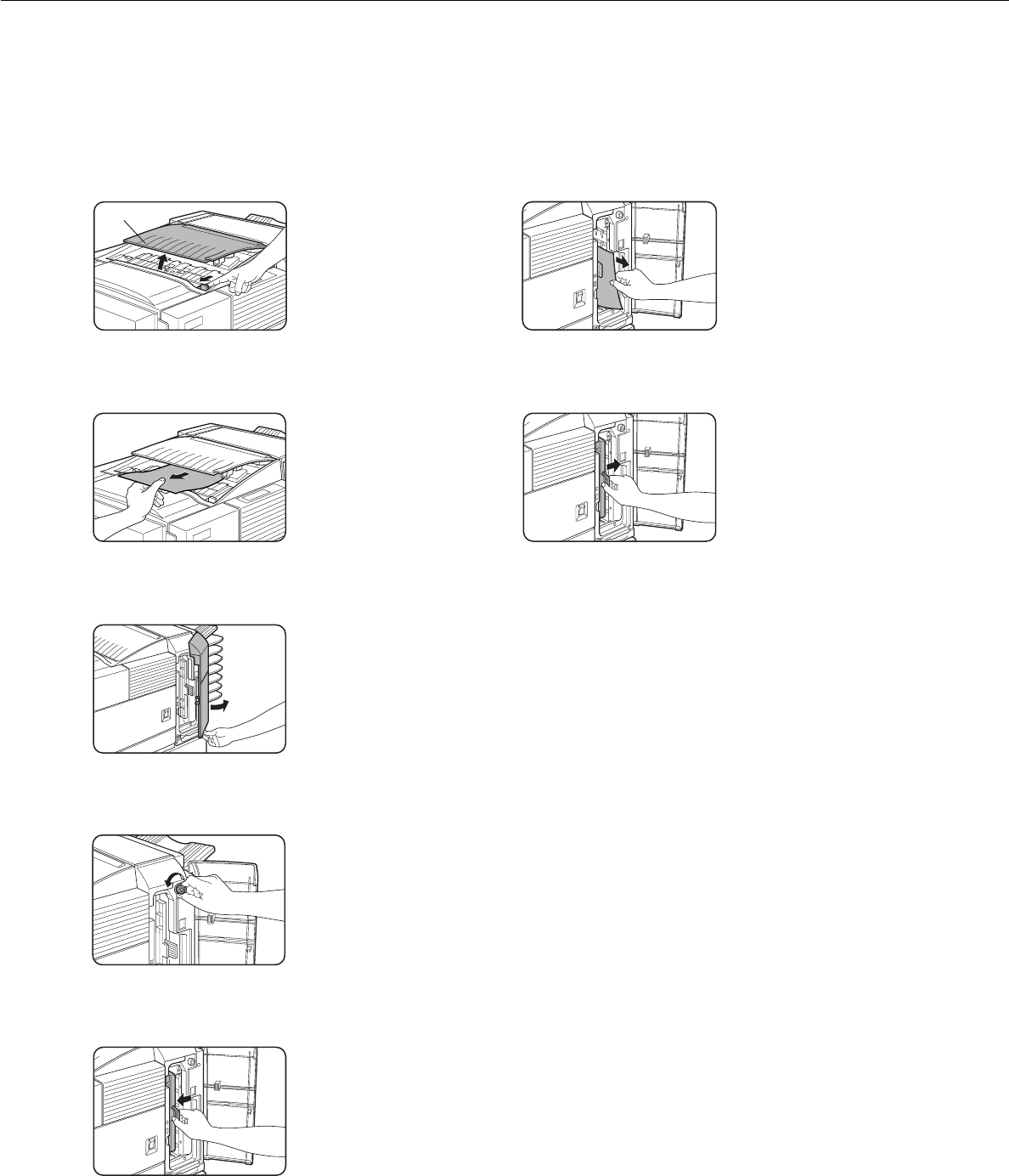
- Misfeed in the finisher 252
- SADDLE STITCH FINISHER 255
- PrintoutsOriginal 256
- Offset mode Non-offset mode 256
- Roller rotating knob A 259
- Staple unit 259
- Right bindingLeft binding 266
- Portrait orientation printing 266
- PRINTER SPECIFICATIONS 268
- NOTICE PAGE PRINTING 271
- PRINT AREA 272
- PRODUCT CONFIGURATION 277
- SOFTWARE LICENSE 278
- Photoconductive drum 281
- SUPPLY LIST 284
Relacionado con productos y manuales para Copiadoras Sharp AR-4551
 (16 paginas)
(14 paginas)
(97 paginas)
(47 paginas)
(20 paginas)
(2 paginas)
(4 paginas)
(2 paginas)
(200 paginas)
(36 paginas)
(108 paginas)
(4 paginas)
(2 paginas)
(8 paginas)
(80 paginas)
(98 paginas)
(34 paginas)
(16 paginas)
(14 paginas)
(97 paginas)
(47 paginas)
(20 paginas)
(2 paginas)
(4 paginas)
(2 paginas)
(200 paginas)
(36 paginas)
(108 paginas)
(4 paginas)
(2 paginas)
(8 paginas)
(80 paginas)
(98 paginas)
(34 paginas)
 (80 paginas)
© 2020, manymanuals.es. Todos los derechos reservados | 0.038 s |
 Manymanuals.com
 Manymanuals.de
 Manymanuals.fr
 Manymanuals.it
 Manymanuals.pl
 Manymanuals.cz
 Manymanuals.es
 Manymanuals-pt.com
Comentarios a estos manuales