Sharp AL-1200 Especificaciones Pagina 14
- Pagina / 47
- Tabla de contenidos
- SOLUCIÓN DE PROBLEMAS
- MARCADORES

- FOR YOUR PROTECTION 1
- 1 - 800 - BE-SHARP 1
- CONTENTS 2
- USER MAINTENANCE 3
- GETTING STARTED 4
- MAIN FEATURES 5
- Getting started 6
- PART NAMES 7
- OPERATION PANEL 8
- INSTALLATION 9
- CAUTIONS ON HANDLING 10
- ACCESSORIES 11
- UNPACKING 11
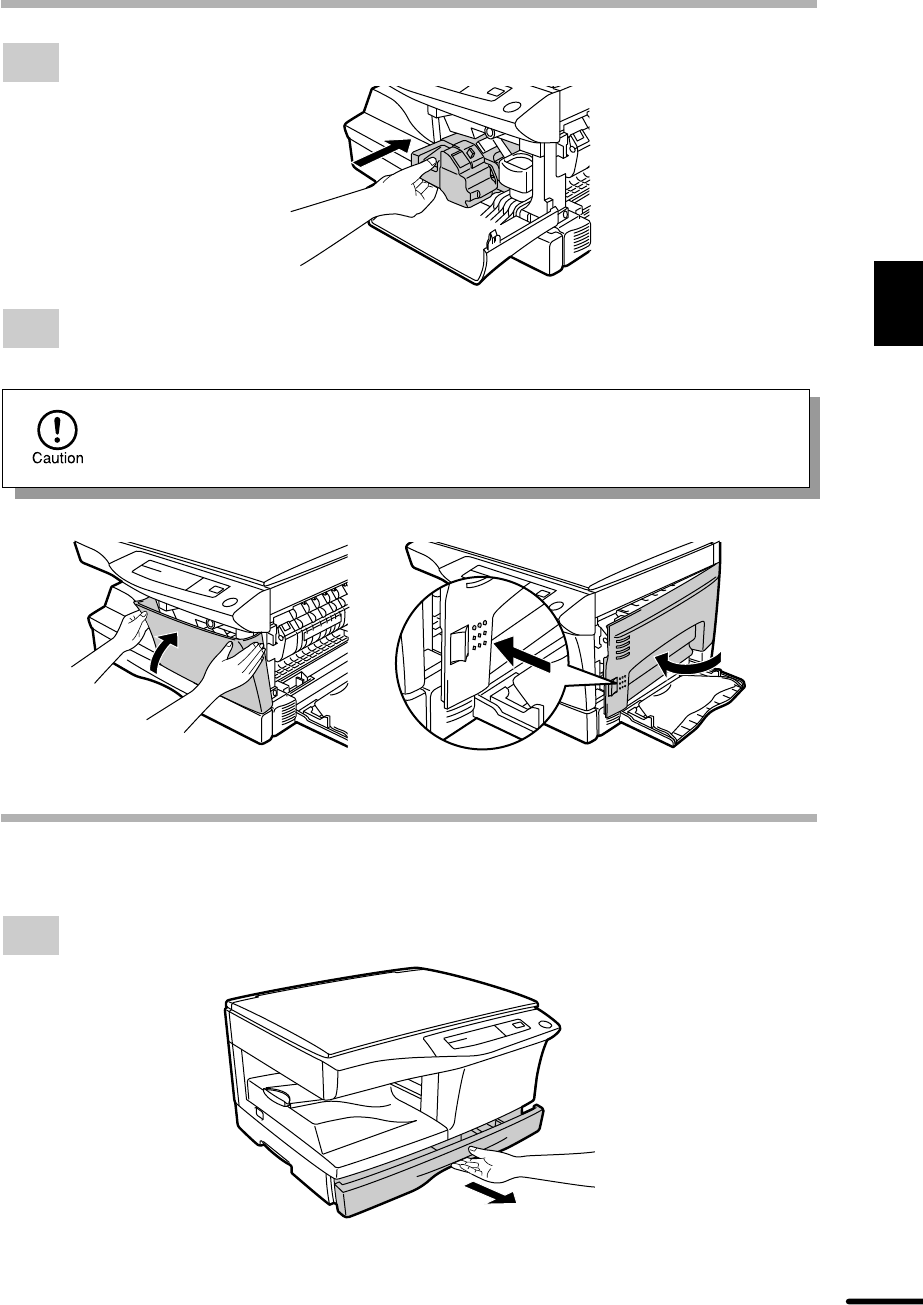
- INSTALLING THE TD CARTRIDGE 12
- Installation 13
- CAUTION tape Protective pins 13
- 4 or 5 times 13
- POWER TO COPIER 16
- POWER ON 17
- MAKING COPIES 18
- NORMAL COPYING 19
- Setting a large original 20
- REDUCTION/ENLARGEMENT/ZOOM 21
- Making copies 22
- TWO-SIDED COPYING 23
- SPECIAL FUNCTIONS 25
- USER PROGRAMS 26
- Special functions 27
- SUPPLIES AND USER MAINTENANCE 28
- DRUM CARTRIDGE REPLACEMENT 29
- USER MAINTENANCE 30
- Transfer charger 31
- When copier is not in use 31
- Copier lens cleaning 32
- COPIER TROUBLE? 33
- B Misfeed in the fusing area 34
- Copier trouble? 35
- MISFEED REMOVAL 35
- Fusing unit release lever 35
- Feeding roller 35
- TROUBLESHOOTING 36
- STATUS INDICATORS 37
- AUTOMATIC EXPOSURE ADJUSTMENT 38
- APPENDIX 39
- Appendix 40
- MOVING INSTRUCTIONS 41
- WARNING: 46
- SHARP ELECTRONICS CORPORATION 47
- SHARP CORPORATION 47
- © 1998 SHARP CORPORATION 47
- PRINTED IN JAPAN 47
- TINSE0067QSZZw 47
Relacionado con productos y manuales para Multifuncionales Sharp AL-1200
 (248 paginas)
(30 paginas)
(52 paginas)
(177 paginas)
(52 paginas)
(4 paginas)
(4 paginas)
(42 paginas)
(248 paginas)
(30 paginas)
(52 paginas)
(177 paginas)
(52 paginas)
(4 paginas)
(4 paginas)
(42 paginas)
 (2 paginas)
 (12 paginas)
(216 paginas)
(28 paginas)
(12 paginas)
(12 paginas)
(216 paginas)
(28 paginas)
© 2020, manymanuals.es. Todos los derechos reservados | 0.021 s |
 Manymanuals.com
 Manymanuals.de
 Manymanuals.fr
 Manymanuals.it
 Manymanuals.pl
 Manymanuals.cz
 Manymanuals.es
 Manymanuals-pt.com
Comentarios a estos manuales