Sharp MX-C380 Guia de preparacion Pagina 109
- Pagina / 256
- Tabla de contenidos
- SOLUCIÓN DE PROBLEMAS
- MARCADORES

- Operation Guide 1
- Manual name Contents 2
- ABOUT OPERATION MANUAL 3
- CHAPTER 1 4
- MAINTENANCE 5
- ENTERING TEXT 5
- INTERIOR 8
- SIDE AND BACK 9
- OPERATION PANEL 10
- USING THE OPERATION PANEL 11
- Entering numbers 12
- BEFORE USING THE MACHINE 13
- Entering with the arrow keys 13
- Using the soft numeric keypad 13
- A4 F.Colour 14
- USING THE WEB PAGE 15
- TURNING THE POWER ON AND OFF 16
- ENERGY SAVE FUNCTIONS 17
- [POWER SAVE] KEY 17
- USER AUTHENTICATION 18
- Select the [OK] key 19
- [Quick] key 20
- Select the [Password] key 21
- ACCESSING THE WEB PAGE 23
- USER CONTROL 24
- Factory-stored users 25
- Settings 25
- DEFAULT SETTING 27
- PAGE LIMIT GROUP LIST 29
- AUTHORITY GROUP LIST 30
- VIEW USER COUNT 33
- Example: RealVNC 34
- SAVE / DELETE JOB LOG 35
- VIEW JOB LOG 35
- ITEMS RECORDED IN THE JOB LOG 36
- STORAGE BACKUP 38
- DEVICE CLONING 39
- LOADING PAPER 40
- Trays 1 to 4 41
- Bypass tray 41
- Paper that cannot be used 42
- Non-recommended paper 42
- Inserting paper 46
- Inserting transparency film 46
- Loading envelopes 47
- PERIPHERAL DEVICES 48
- FINISHER 49
- SHARP OSA 50
- EXTERNAL ACCOUNT APPLICATION 51
- Close the front cover 54
- CONTAINER 55
- / DRUM CARTRIDGE 58
- Open the main charger cover 59
- Turn on the power 62
- REPLACING THE DRUM CARTRIDGE 63
- THE FINISHER 65
- REGULAR MAINTENANCE 67
- Remove the charger cleaner 68
- Clean the main charger 68
- CLEANING THE LASER UNIT 72
- Clean the laser unit 74
- Replace the cleaning tool 74
- CLEANING THE PT CHARGER 76
- CHAPTER 2 80
- PRINTING FROM WINDOWS 83
- Select print settings 84
- Click the [Print] button 84
- SELECTING THE PAPER 85
- PRINTING ON ENVELOPES 86
- VIEWING PRINTER DRIVER HELP 89
- SAVING FREQUENTLY USED PRINT 90
- SETTINGS 90
- Check and save the settings 91
- Click the [OK] button 91
- USING SAVED SETTINGS 92
- CHANGING THE PRINTER DRIVER 93
- DEFAULT SETTINGS 93
- [OK] button 94
- PRINTING FROM A MACINTOSH 95
- PRINTING WHEN THE USER 100
- Start printing 101
- FREQUENTLY USED FUNCTIONS 102
- (1) Select [Color] 103
- (1) Click the [Advanced] tab 104
- TWO-SIDED PRINTING 105
- [Short-edged binding] 106
- (1) Select [Layout] 106
- A5 or Invoice A4 or Letter 107
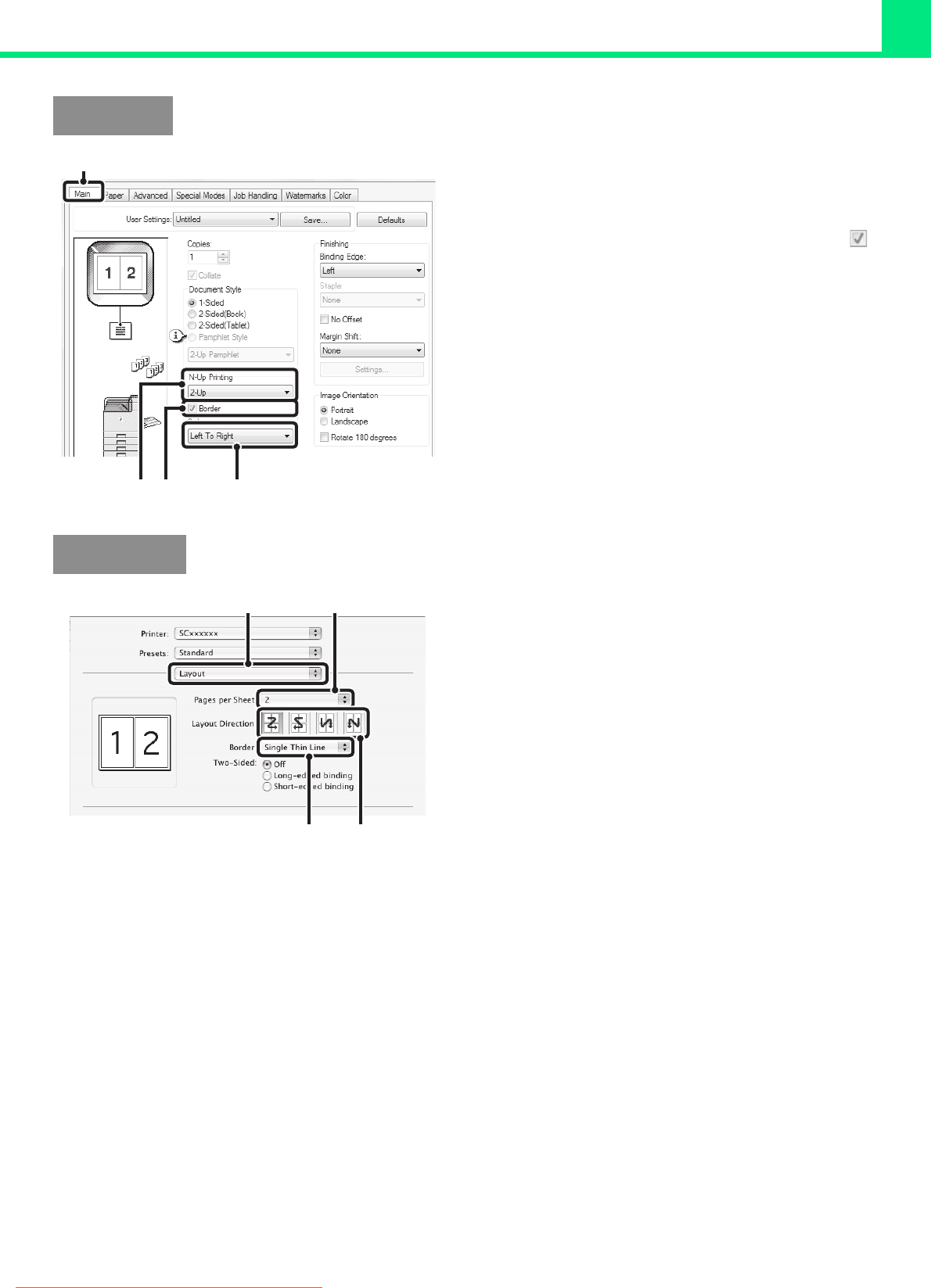
- PRINTING 108
- Macintosh 109
- STAPLING OUTPUT 110
- CONVENIENT PRINTING FUNCTIONS 112
- (1) Click the [Paper] tab 115
- (3) Select poster settings 115
- ORIENTATION OF THE IMAGE 116
- (Zoom/XY-Zoom) 117
- (Line Width Settings) 118
- THE IMAGE (Colour Adjustment) 120
- ABCD ABCD 121
- IMAGE TYPE (Advanced Colour) 122
- CONFIDENTIAL 124
- (Image Stamp) 125
- Create an overlay file 126
- Printing with an overlay file 126
- PRINT FUNCTIONS FOR SPECIAL 127
- PURPOSES 127
- (2) Select [Different Paper] 128
- [Settings] button 130
- [Retention] menu 133
- (1) Select [Job Handling] 134
- PRINTING A STORED FILE 135
- [Print and Save] key 136
- (1) Log into the machine 137
- (2) Perform print all 137
- PRINT SETTINGS SCREEN 138
- MULTI-FILE PRINTING 139
- Printing a selected file 140
- Batch printing 141
- Select the user name 142
- DELETING A STORED FILE 144
- Automatic deletion of files 145
- SEARCHING FOR A STORED FILE 146
- Using the user name to search 147
- Using the file name to search 147
- PRINTING WITHOUT THE PRINTER 148
- Press the [PRINT] key 149
- Access the FTP server 149
- Print the selected file 150
- Access the USB memory device 151
- Access the network 153
- Access the network folder 154
- SUBMIT PRINT JOB 156
- FTP PRINT 156
- E-MAIL PRINT 157
- CHECKING THE PRINT STATUS 158
- Job key display 159
- Press the [JOB STATUS] key 160
- Select the [Yes] key 160
- GIVING A PRINT JOB 161
- CANCELLING A PRINT JOB 162
- PRINTING WHEN PAPER RUNS OUT 163
- Colour / B/W: 164
- JOB STATUS SCREEN 165
- APPENDIX 167
- CHAPTER 3 169
- SYSTEM SETTINGS 169
- WEB PAGE 170
- THE WEB PAGE 170
- Common Operation Methods 173
- Opening the Web pages 174
- SYSTEM SETTINGS (GENERAL) ON 175
- THE OPERATION PANEL 175
- Display Contrast 176
- Total Count 176
- Default Settings 176
- List Print (User) 177
- Paper Tray Settings 177
- USB-Device Check 177
- Tray Settings 182
- ON THE OPERATION PANEL 184
- Select the [Login Name] key 185
- (3) Select the [OK] key 186
- Login by user number 187
- Device Control 188
- Energy save 188
- Operation Settings 188
- Network Settings 189
- List Print (Administrator) 189
- Security Settings 189
- Product Key 190
- Sharp OSA Settings 190
- Energy Save 191
- Restore Factory Defaults 197
- Store Current Configuration 197
- Restore Configuration 197
- SYSTEM SETTINGS (GENERAL) IN 199
- Paper Type Registration 200
- Printer Condition Settings 201
- Settings of each tray 206
- PCL Settings 210
- Printer Settings 215
- Print Hold Setting 216
- Enable/Disable Settings 217
- Remote Operation Settings 221
- Disabling of Stapler 222
- Calibration 223
- Colour Balance 224
- Color Chart 225
- Interface Settings 227
- CHAPTER 4 234
- TROUBLESHOOTING 234
- REMOVING MISFEEDS 235
- HOW TO REMOVE MISFEEDS 236
- REMOVING STAPLE JAMS 239
- Replace the staple case 240
- Close the cover 240
- ☞ Software Setup Guide 242
- PROBLEMS RELATED TO FILING 247
- GENERAL PROBLEMS 248
- OTHER PROBLEMS 255
- MXC380P-EX-Z1 256
Relacionado con productos y manuales para Las Impresoras Láser / Led Sharp MX-C380
 (108 paginas)
© 2020, manymanuals.es. Todos los derechos reservados | 0.021 s |
 Manymanuals.com
 Manymanuals.de
 Manymanuals.fr
 Manymanuals.it
 Manymanuals.pl
 Manymanuals.cz
 Manymanuals.es
 Manymanuals-pt.com
Comentarios a estos manuales