Sharp AN-CM250 Especificaciones Pagina 45
- Pagina / 97
- Tabla de contenidos
- SOLUCIÓN DE PROBLEMAS
- MARCADORES

- SHARP CORPORATION 1
- Introduction 2
- WARNING: 3
- PRODUCT DISPOSAL 3
- INFORMATION 3
- Declaration of Conformity 3
- Contents 4
- Easy to Use Functions 5
- Appendix 5
- IMPORTANT SAFEGUARDS 6
- SharpVision Manager 9
- Quick Guide 10
- Part Names 11
- Projector (Rear View) 12
- Remote Control (Front View) 13
- Remote Control (Top View) 13
- Using the Remote Control 14
- 3 Insert the lower tab of the 14
- Accessories 15
- Connections and Setup 16
- Before Connecting 17
- Connecting the Power 17
- Connecting to Video Equipment 18
- Connecting to 19
- Component Video 19
- Equipment Using a 19
- Component Cable 19
- (INPUT 1 or 2) 19
- 1 Connect a DVI to HDMI cable 22
- Connecting to a Computer 23
- Using the DVI to 15-pin 23
- D-sub Adaptor and the 23
- RGB Cable (INPUT 5) 23
- Connecting to a Com 24
- Cable (INPUT 5) 24
- “Plug and Play” function 25
- 1 Connect an RS-232C cable to 26
- Connecting the Remote 27
- Control to the Projector 27
- 2 Remove your hands from the 28
- 2 Zooming is adjusted by mov 29
- Using the Lens Shift 30
- Audience 31
- Projection using a mirror 33
- Ceiling-mount setup 33
- Basic Operation 34
- Image Projection 35
- 3 Press , , , or 36
- 1 Press 37
- 4 Press 37
- 1 Press on the remote control 38
- UNDO button 40
- Menu Bar Items 41
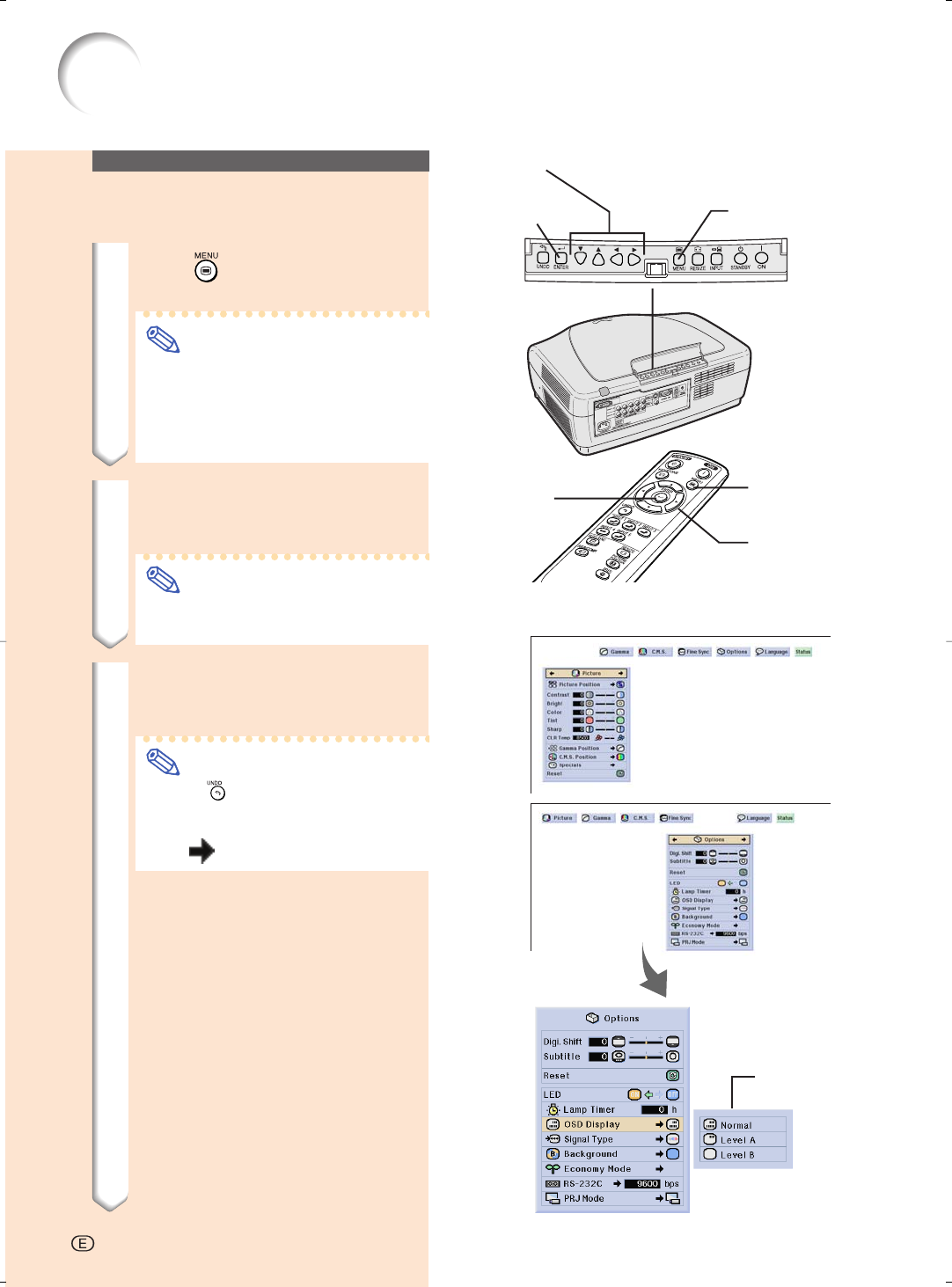
- Using the Menu Screen 43
- 2 Press 44
- 3 Press 44
- 4 Press 44
- 5 Press 44
- 5 Press 46
- 6 Press 46
- 7 Press 46
- Adjusting the Picture 47
- Adjusting Image Prefer 48
- Selecting the Gamma 48
- Position 48
- Selecting the C.M.S 49
- Special Settings 49
- Emphasizing the 51
- Contrast 51
- Reducing Image Noise 51
- Emphasizing Outlines 52
- Resetting All Adjust 52
- Adjusting the Gamma 53
- Selecting the Target 55
- Resetting User-Defined 57
- Color Settings 57
- Overview of All Color 57
- Settings 57
- Adjusting Computer Images 58
- Selecting Adjustment Settings 59
- Special Mode Settings 59
- Checking the Input Signal 60
- Auto Sync Adjustment 60
- Auto Sync Display 61
- Function 61
- Switching the Picture 63
- Display Using Different 63
- Input Signals 63
- COMPUTER 65
- Switching HIGH 66
- BRIGHTNESS MODE/ 66
- HIGH CONTRAST MODE 66
- Digital Shift Function 67
- Subtitle Setting 67
- LED Off Function 68
- Setting On-screen Display 69
- Selecting the Signal Type 70
- Setting the Video System 71
- Setting a Background Image 71
- Selecting the Economy Mode 72
- Selecting the Transmis 73
- Automatic Power Off 73
- Setting the Projection 74
- Overview of All Menu 75
- Neutral detergent 77
- Cleaning 77
- Cleaner 78
- Maintenance Indicators 79
- Regarding the Lamp 81
- 1 Press 82
- 2 Disconnect the power cord 82
- 3 Remove the lamp unit cover 82
- 4 Remove the lamp unit 83
- 5 Insert the new lamp unit 83
- 6 Attach the lamp unit cover 83
- 1 Connect the power cord 83
- 2 Reset the lamp timer 83
- Connecting Pin Assignments 84
- PC control 85
- Communication conditions 85
- Basic format 85
- Commands 85
- Computer Compatibility Chart 89
- Troubleshooting 90
- Specifications 92
- Dimensions 93
- Glossary 94
- VALID IN USA ONLY 96
- Consumer Electronics Products 97
Relacionado con productos y manuales para Proyectores de datos Sharp AN-CM250
 (73 paginas)
 (70 paginas) (10 paginas)
(17 paginas)
(54 paginas)
(40 paginas)
(59 paginas)
(45 paginas)
(70 paginas) (10 paginas)
(17 paginas)
(54 paginas)
(40 paginas)
(59 paginas)
(45 paginas)
© 2020, manymanuals.es. Todos los derechos reservados | 0.035 s |
 Manymanuals.com
 Manymanuals.de
 Manymanuals.fr
 Manymanuals.it
 Manymanuals.pl
 Manymanuals.cz
 Manymanuals.es
 Manymanuals-pt.com
Comentarios a estos manuales