Sharp MX-M200D Especificaciones Pagina 71
- Pagina / 100
- Tabla de contenidos
- SOLUCIÓN DE PROBLEMAS
- MARCADORES

- MX-M160D 1
- MX-M200D 1
- Notice for users in the UK 2
- Part 1: General Information 3
- Trademark acknowledgments 4
- PRODUCT CONFIGURATIONS 5
- CONTENTS 6
- CAUTIONS 8
- LASER INFORMATION 9
- INSTALLATION REQUIREMENTS 10
- MANUALS PROVIDED WITH THE 11
- MAIN FEATURES 12
- Fax function (option) 13
- Network connection (option) 13
- BEFORE USING THE PRODUCT 14
- OPERATION PANEL 16
- (6) (8)(7) (9) (10) (11) (12) 17
- Display (base screen) 18
- TURNING THE POWER ON AND OFF 19
- LOADING PAPER 20
- Open the bypass tray 22
- AUDITING MODE 25
- TROUBLESHOOTING AND 26
- MAINTENANCE 26
- TROUBLESHOOTING 27
- < >: Tray number 30
- REMOVING MISFEEDS 31
- MISFEED IN THE BYPASS TRAY 32
- MISFEED IN THE MACHINE 33
- Misfeed in B 34
- MISFEED IN TRAY 1 35
- MISFEED IN TRAY 2 36
- REPLACING THE TONER CARTRIDGE 37
- CLEANING THE MACHINE 39
- CLEANING THE TRANSFER CHARGER 40
- FUNCTION 41
- PERIPHERAL DEVICES AND 42
- SUPPLIES 42
- PAPER FEED UNIT 43
- STORAGE OF SUPPLIES 44
- Part 2: Copier Operation 45
- COPY FUNCTIONS 47
- Copying from the SPF 48
- A3 paper 49
- 50
- 100% 50
- SELECTING THE TRAY 51
- SETTING THE NUMBER OF COPIES 51
- SELECTING THE ORIGINAL SIZE 52
- REDUCING OR ENLARGING A COPY 54
- SELECTING THE VERTICAL AND 56
- ACC. #-C 57
- TWO-SIDED COPYING 58
- (ONLY WHEN USING THE RSPF) 61
- TWO-SIDED COPIES USING THE 63
- BYPASS TRAY 63
- /2x11 ) 64
- INTERRUPTING A COPY RUN 65
- CONVENIENT COPY 66
- FUNCTIONS 66
- NO SORT 67
- SINGLE SHEET OF PAPER 68
- LEX SCAN 69
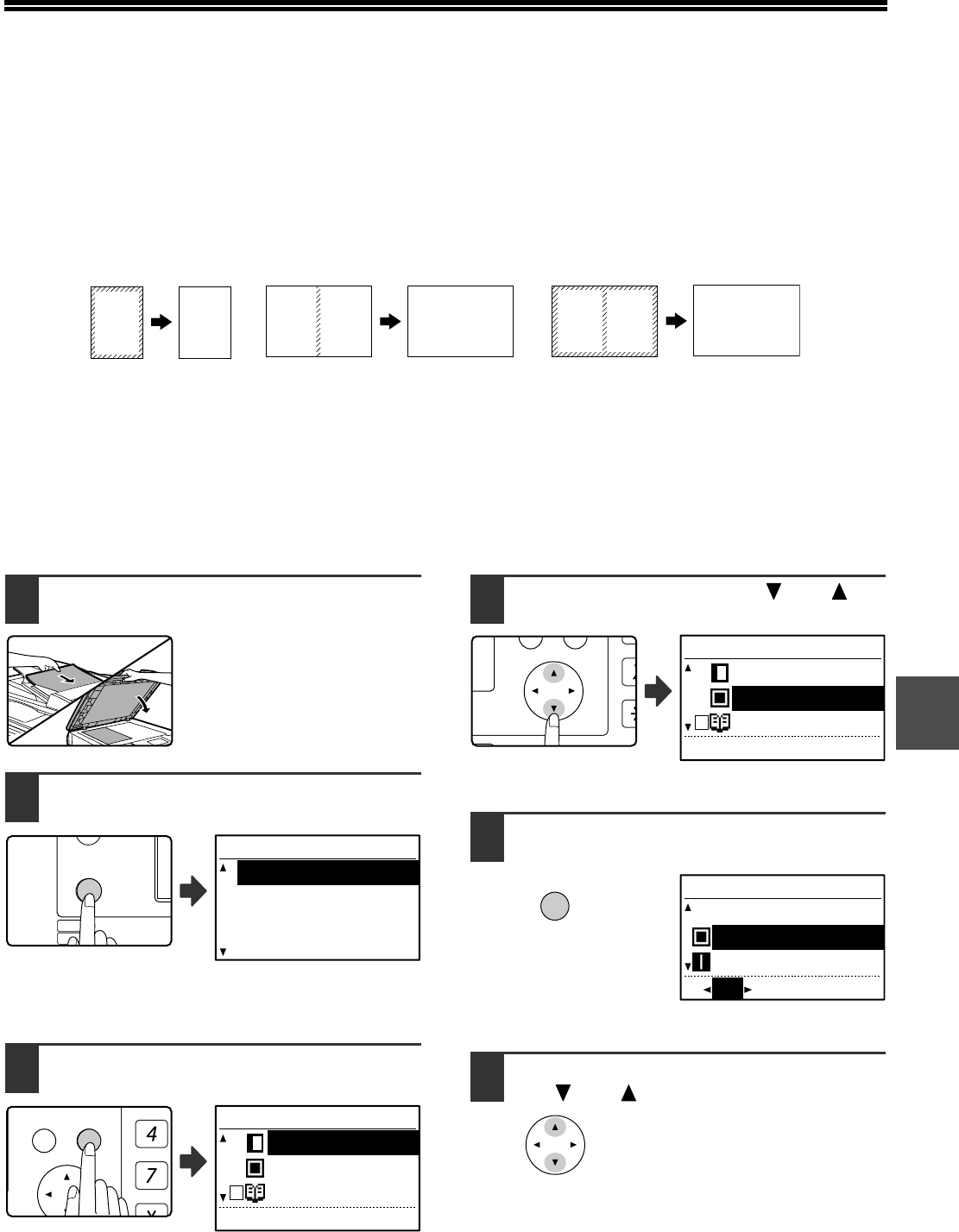
- CREATING MARGINS WHEN COPYING 70
- ERASING SHADOWS AROUND THE 71
- EDGES OF A COPY 71
- Press the [OK] key 72
- CARD SHOT 73
- Press the [START] key ( ) 74
- APPENDIX 75
- Output tray specifications 76
- SYSTEM SETTINGS GUIDE 77
- PROGRAMMING AN ADMINISTRATOR 78
- PASSWORD 78
- SYSTEM SETTINGS LIST 79
- USING THE SYSTEM SETTINGS 80
- ACCOUNT CONTROL 81
- ACC. # CONTROL 82
- DELETE 82
- CHANGE 82
- ACCOUNT LIMIT 83
- SINGLE ACC. LIMIT 83
- ALL ACC. LIMIT 83
- DEVICE CONTROL 84
- OPERATION SETTING 85
- ENERGY SAVE 87
- COPY SETTINGS 88
- DEFAULT EXPOSURE 89
- STREAM FEEDING 89
- ROTATION COPY 89
- SORT AUTO SELECT 89
- RESOLUTION IN AUTO/TEXT MODE 90
- PHOTO MODE DEFAULT 90
- LIMIT OF COPIES 90
- DISABLE AUTO PAPER SELECTION 90
- DISABLE 2-SIDED COPY 90
- Troubleshooting 93
- INDEX BY PURPOSE 93
- Convenient copy functions 93
- Copying, starting 93
- ADMINISTRATOR PASSWORD 97
- NUMBER: FACTORY SETTING 97
- Notice for Users in Europe 99
- MX-M160/MX-M160D/MX-M200D 100
Relacionado con productos y manuales para Copiadoras Sharp MX-M200D
 (76 paginas)
(220 paginas)
(148 paginas)
(80 paginas)
(8 paginas)
(59 paginas)
(196 paginas)
(32 paginas)
(2 paginas)
(4 paginas)
(125 paginas)
(2 paginas)
(144 paginas)
(10 paginas)
(286 paginas)
(16 paginas)
(76 paginas)
(220 paginas)
(148 paginas)
(80 paginas)
(8 paginas)
(59 paginas)
(196 paginas)
(32 paginas)
(2 paginas)
(4 paginas)
(125 paginas)
(2 paginas)
(144 paginas)
(10 paginas)
(286 paginas)
(16 paginas)
© 2020, manymanuals.es. Todos los derechos reservados | 0.030 s |
 Manymanuals.com
 Manymanuals.de
 Manymanuals.fr
 Manymanuals.it
 Manymanuals.pl
 Manymanuals.cz
 Manymanuals.es
 Manymanuals-pt.com
Comentarios a estos manuales