Sharp AR-BC320 Especificaciones Pagina 37
- Pagina / 140
- Tabla de contenidos
- SOLUCIÓN DE PROBLEMAS
- MARCADORES

- AR-BC320 1
- Warranty 2
- Part 1: General Information 3
- OPERATION MANUALS 5
- INSTALLATION REQUIREMENTS 6
- Moving this machine 7
- CAUTIONS 8
- CONTENTS 10
- CHAPTER 1 11
- INTRODUCTION 12
- MAIN FEATURES 12
- Energy saving features 13
- PART NAMES AND FUNCTIONS 14
- Interior 15
- Operation panel 18
- Touch panel 19
- JOB QUEUE 20
- COMPLETE 20
- PRIORITY 20
- AUDITING MODE 21
- CHAPTER 2 23
- LOADING PAPER 24
- Horizontal 27
- Vertical 27
- Can be used 28
- Cannot be used 28
- 500 sheet paper drawer) 29
- Upper tray: 30
- Middle and lower paper trays: 30
- Specifications of paper trays 31
- Setting the paper type 33
- (except the bypass tray) 33
- Setting the paper size when 33
- PAPER SELECT 34
- CONDITION 34
- SETTINGS 34
- CUSTOM SETTINGS 35
- About the settings 36
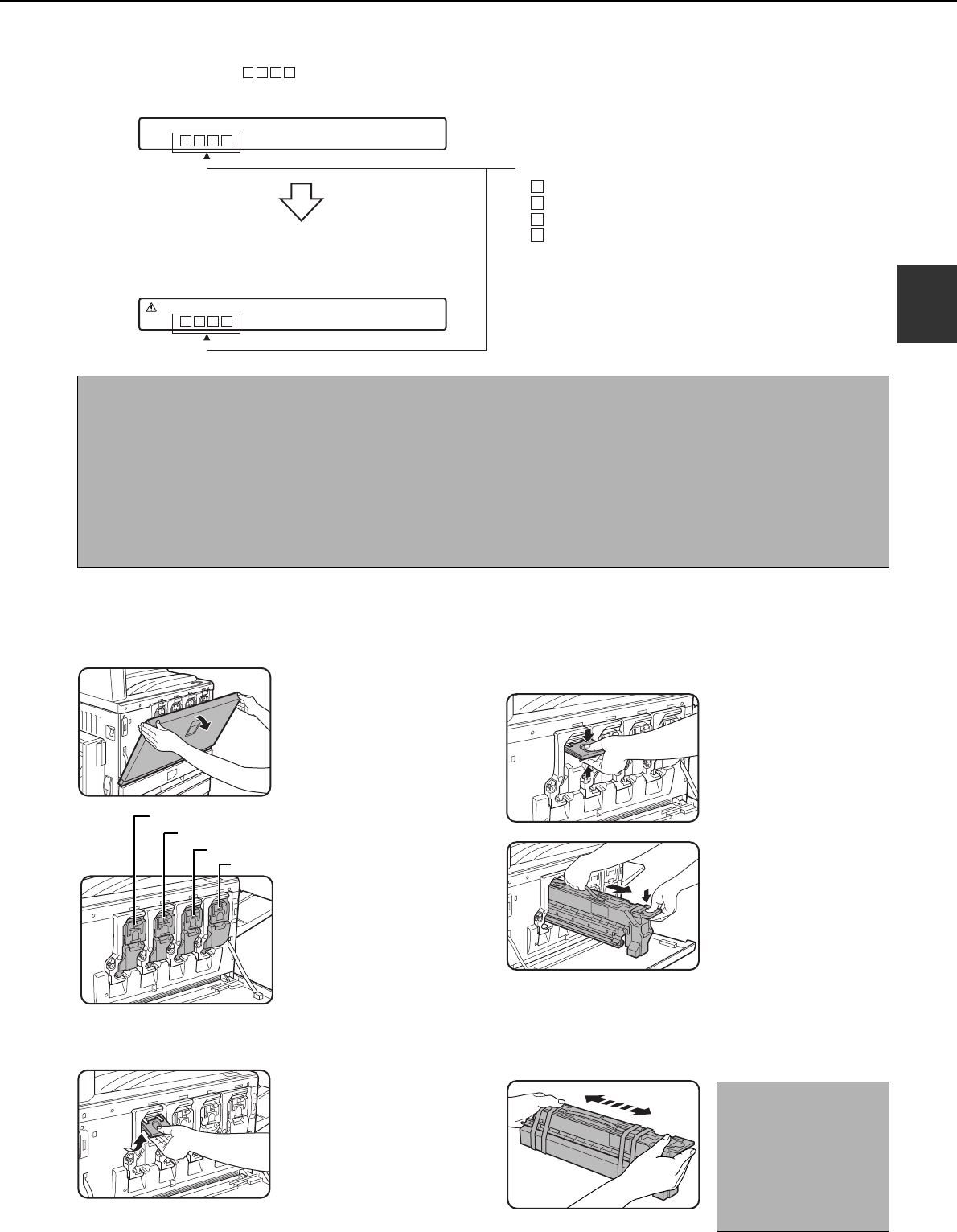
- READY TO COPY 37
- CHANGE THE TONER CARTRIDGE 37
- ([ ]) 37
- STORAGE OF SUPPLIES 39
- MISFEED REMOVAL 40
- Misfeed in the bypass tray 41
- Transport area 42
- Exit area 42
- Fusing area 42
- CHAPTER 3 49
- SADDLE STITCH FINISHER 50
- Supplies 51
- <Example> 53
- Roller rotating 55
- Staple unit 55
- ■ Staple jam removal 56
- Be careful not to tear the 59
- LARGE CAPACITY TRAY 63
- Release lever 65
- Upper right 65
- Part 2: Copier Operation 67
- CHAPTER 4 69
- Operation Panel 71
- Acceptable originals 73
- SETTING ORIGINALS 74
- SELECTING THE ORIGINAL SIZE 76
- STORING, DELETING, AND USING 77
- ORIGINAL SIZES 77
- CHAPTER 5 79
- NORMAL COPYING 80
- 2-SIDED COPY 81
- Copy mode output restrictions 82
- Copy output (sort and group) 83
- About the offset function 83
- Touch the [2-SIDED COPY] key 84
- Touch the [OK] key 84
- AUTO 8½x11 85
- READ-END 86
- (pages 4-6 to 4-9) 87
- EXPOSURE ADJUSTMENTS 88
- REDUCTION/ENLARGEMENT/ZOOM 90
- COPY RATIO 91
- Original 93
- HEAVY PAPER 94
- PLAIN PAPER 94
- RANSPARENCY 94
- ENVELOPE 94
- SPECIAL PAPERS 95
- CHAPTER 6 97
- SPECIAL MODES 98
- MARGIN SHIFT 99
- CENTERING 99
- Margin shift 100
- CANCEL OK 101
- Dual page copy 102
- Centering 103
- TRANSPARENCY 104
- ■ Copying onto a cover ■ 105
- ■ Not copying onto a cover 105
- B/W reverse 106
- COLOR ADJUSTMENTS MENU 107
- RGB adjust 108
- Sharpness 109
- Suppress background 109
- RGB ADJUST 110
- Brightness 111
- Intensity 111
- IMAGE EDIT MENU 112
- Single color 113
- Mirror image 113
- Photo Repeat 114
- PHOTO REPEAT MU 115
- PAMPHLET COPY PAMP 115
- AT MULTI SHOT 116
- SINGLE COLOR 117
- FULL-BLEED 117
- Multi-page enlargement 118
- PHOTO REPEAT MUL 120
- PAMPHLET COPY 120
- JOB PROGRAM MEMORY 121
- Recalling a job program 122
- Deleting a stored job program 122
- INTERRUPTING A COPY RUN 123
- CHAPTER 7 125
- REMOVING AN ORIGINAL MISFEED 126
- TROUBLESHOOTING 128
- CHAPTER 8 131
- SPECIFICATIONS 132
- For users in the USA 139
- SHARP ELECTRONICS CORPORATION 140
Relacionado con productos y manuales para Copiadoras Sharp AR-BC320
 (100 paginas)
(14 paginas)
(92 paginas)
(104 paginas)
(12 paginas)
(4 paginas)
(40 paginas)
(12 paginas)
(12 paginas)
(88 paginas)
(117 paginas)
(12 paginas)
(56 paginas)
(44 paginas)
(100 paginas)
(14 paginas)
(92 paginas)
(104 paginas)
(12 paginas)
(4 paginas)
(40 paginas)
(12 paginas)
(12 paginas)
(88 paginas)
(117 paginas)
(12 paginas)
(56 paginas)
(44 paginas)

 (47 paginas)
(160 paginas)
(79 paginas)
(36 paginas)
(8 paginas)
(16 paginas)
(47 paginas)
(160 paginas)
(79 paginas)
(36 paginas)
(8 paginas)
(16 paginas)
© 2020, manymanuals.es. Todos los derechos reservados | 0.033 s |
 Manymanuals.com
 Manymanuals.de
 Manymanuals.fr
 Manymanuals.it
 Manymanuals.pl
 Manymanuals.cz
 Manymanuals.es
 Manymanuals-pt.com
Comentarios a estos manuales